Record, transcribe, summarize & chat with your meetings.
Tape captures both sides of every call and runs the AI on your Mac: on-device transcription, instant summaries, and a chat that answers questions about any meeting, drafts your follow-up email, and pulls out your action items. 100% local. 100% free. No cloud, no account, no subscription.
Free · macOS 15+ · Apple Silicon · ~15 MB
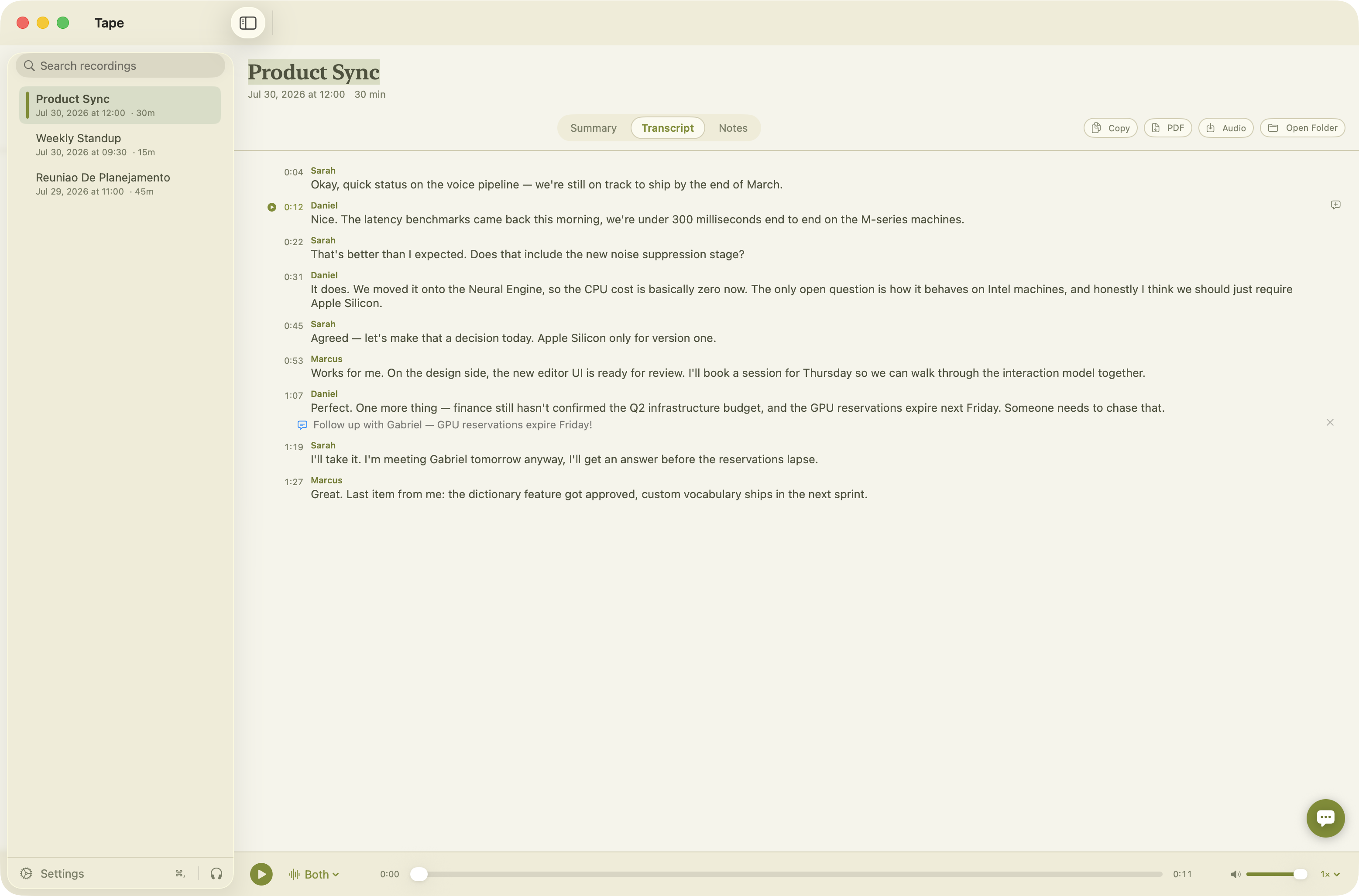
A complete meeting memory, in your menu bar
Tape lives quietly in the menu bar until a meeting starts. Then it does the work a $20/month service does, locally.
Both sides of the call
Records your microphone and the Mac's system audio as separate clean tracks: Zoom, Teams, Meet, WhatsApp, anything that makes sound.
Meeting detection
When a meeting app grabs your mic, Tape offers to record, pre-named from your calendar event or the call's window title. Or set it to record automatically.
On-device transcription
Speaker-separated transcripts in English and Português (Brasil) via Parakeet and Whisper, running on the Neural Engine, not someone's server.
AI summaries
A local Gemma 4 model writes the TL;DR, key points, decisions and action items the moment transcription finishes.
Chat with your meeting
Ask anything: “what did we decide?”, “draft the follow-up email”, “what's on me?”. Right-click any transcript line to ask about that exact moment.
Click-to-play transcript
Click any sentence and the audio jumps there. The playing segment stays highlighted, karaoke-style. Choose mic, Mac audio, or the merged track.
Notes & comments
Markdown notes per meeting, plus comments pinned to exact transcript moments. Click a comment,, hear the moment it refers to.
Search your library
Every recording in a searchable sidebar. Rename in the app or in Finder. The folder is the database, and both stay in sync.
Export anything
Copy transcript or summary to the clipboard, export them as PDF, or save the full meeting audio as an m4a. One click each.
Model management
Models ship weekly. Tape shows every model on disk with its real size, lets you download new ones and trash old ones. You choose what runs.
Global shortcuts
⌥⌘R starts or stops a recording from anywhere. ⌥T opens the app. Both toggleable. Quick audio-device switcher included.
Olive, light & dark
A warm paper-and-olive design that follows your system appearance, or force light/dark in Settings.
From “we should record this” to a follow-up email
Summaries that write themselves, and an AI you can question
When transcription finishes, a local Gemma 4 model produces the summary automatically. Need more? Open Ask AI and interrogate the meeting.
- TL;DR, key points, decisions, action items
- One-click follow-up email drafts, ready to send
- “What was in there for me?” for personal action items
- Answers in your language, English or Português
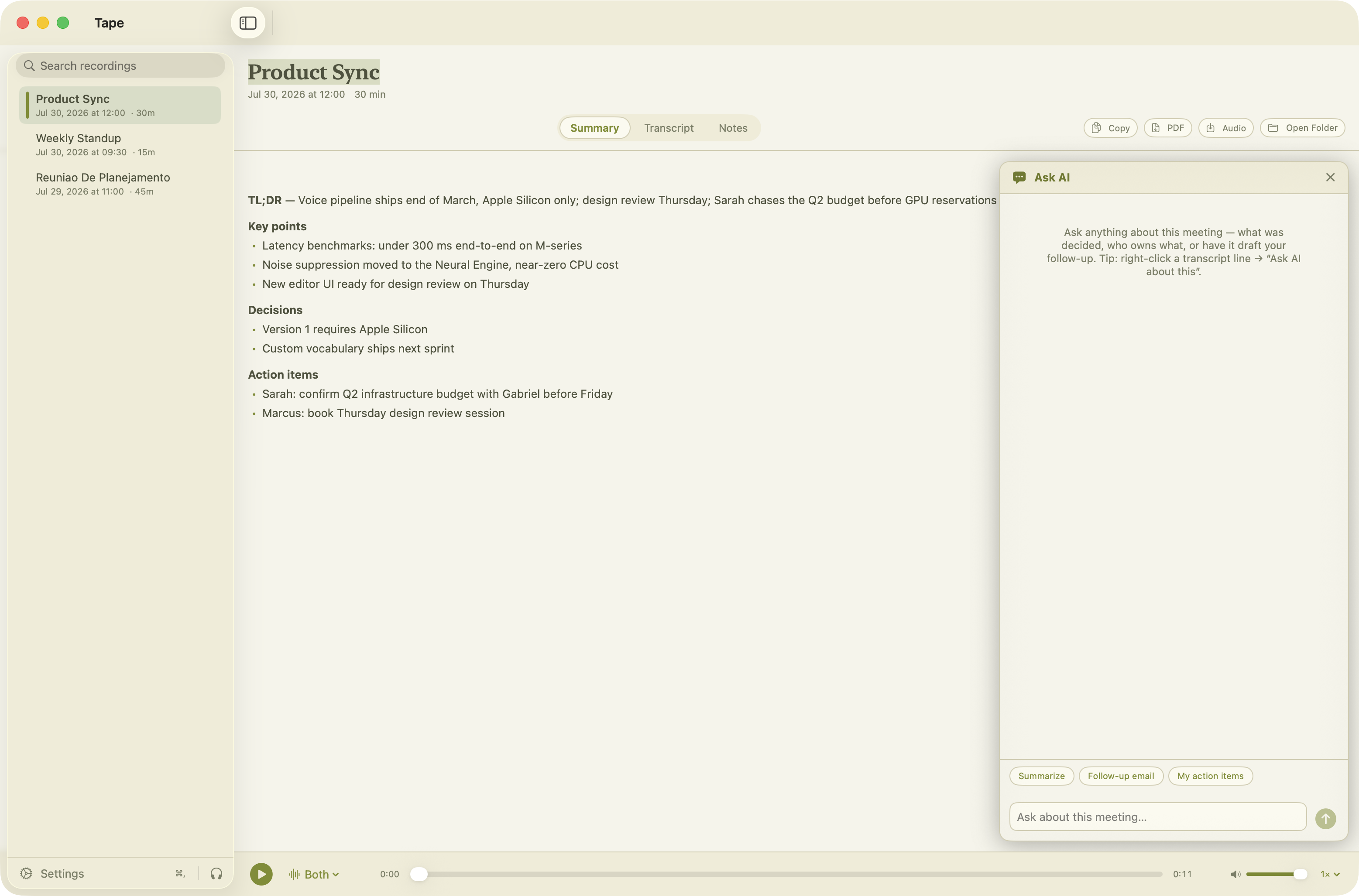
A transcript you can listen to
Every line knows its place in the audio. Click to jump, hover to comment, right-click to send it to the AI.
- Speaker-separated: you vs. everyone else, automatically
- Playback at 0.75×–2×, with per-track selection
- Comments anchored to the exact second
- Copy or export the whole thing in one click
Three steps, zero cloud
Record
Hit ⌥⌘R, click the menu-bar icon, or let meeting detection ask you. Tape captures your mic and the Mac's audio as separate clean tracks.
Transcribe & summarize
On-device models turn both tracks into a speaker-separated transcript, then a local LLM writes the summary. The menu-bar dot glows while it works.
Use it
Read, play, annotate, search, chat, export. Everything lands in a plain folder of Markdown, JSON and audio: yours forever, readable by anything.
State-of-the-art models, running on your silicon
Tape downloads models once and runs them on the Apple Neural Engine and GPU via Core ML and MLX.
| Model | Job | Languages | Size |
|---|---|---|---|
| Parakeet TDT 0.6B default | Transcription, fast & accurate | English | ~600 MB |
| Whisper (tiny → large-v3) | Transcription, multilingual | English, Português +97 | 75 MB – 3 GB |
| Gemma 4 E2B default | Summaries & chat | 140+ | ~2 GB |
| Gemma 4 E4B | Summaries & chat, higher quality | 140+ | ~4 GB |
On a network that blocks model downloads (a corporate proxy or firewall)? Install the models by hand.
The folder is the database
Every recording is a plain folder. Grep it, sync it, back it up, feed it to your own agents. No export required,, no lock-in possible.
├── mic.caf · your voice, clean
├── system.caf · everyone else
├── mixed.m4a · both, merged for playback
├── meta.json · times, duration, offsets
├── transcript.json · structured, timestamped
├── transcript.md · human-readable + your notes
├── summary.md · the AI summary
└── comments.json · your anchored comments
Questions, answered
Is it really free?
Yes. Tape is free to download and use, with every feature included. If it saves you a subscription, a coffee is appreciated, never required.
Does any audio ever leave my Mac?
No. Recording, transcription, summarization and chat all run on your machine. Tape's only network request is checking this site for updates, and you can see that code path in the Settings.
What do I need to run it?
macOS 15 (Sequoia) or newer on Apple Silicon. Transcription and AI use the Neural Engine and GPU; an M1 handles it comfortably.
Which languages are supported?
English (Parakeet, fastest) and Português do Brasil (Whisper) are first-class today, selectable per recording. Whisper itself understands 99 languages, so more are a settings-toggle away.
How does it capture the other side of the call?
Through macOS's native system-audio tap (macOS 14.2+). No kernel extensions,, no virtual audio drivers to install. You grant Microphone and System Audio Recording permissions once.
Stop paying rent on your own meetings.
Free forever. Your recordings, your Mac, your files.
Version 1.0 · macOS 15+ · Apple Silicon
First transcription downloads its model (~600 MB) once, then everything works offline.
Enjoying Tape?
Tape is free and always will be. It's built nights-and-weekends by one person. If it replaced a paid service for you, a coffee keeps the reels spinning.
☕ Buy me a coffee